
Nvidia GeForce Driver Bug May Cause Repeated SSD Writes in Windows 11
As GTA VI arrives, a bug reportedly affecting Nvidia’s GeForce 621.14 and 621.24 drivers is causing the NVDisplay.Container.exe background process to rewrite a log file on some Windows 11 systems, even while the PC is idle. Users have reported approximately 3GB to 30GB of write activity per hour, although not every system running these drivers appears to be affected. Nvidia has not yet acknowledged the issue.
Some users recommend reverting to driver 621.01. However, Nvidia previously had to patch that version because it could cause video freezes and black screens on RTX 50-series GPUs. Nvidia’s Display Container also experienced a similar problem in 2021.
GeForce 621.14 and 621.24 May Repeatedly Rewrite an SSD Log File
The problem was first highlighted by a user named Andergraude in Nvidia’s 621.14 feedback thread, where it was described as new behavior in version 621.14. The affected system used an RTX 4070 Super with Windows 11 25H2.
The NVDisplay.Container.exe process, which runs through the NVIDIA Display Container LS service, repeatedly wrote to the following file:
C:\ProgramData\NVIDIA Corporation\nvtopps\nct\nvlog.nvlgstg
After five minutes of idle time, the process recorded 515MB of requested writes, compared with less than 2MB when using driver 621.01. The reported write activity increased as the file grew, and opening video pages in a browser appeared to make the behavior worse.
Another user running driver 621.24 reported approximately 30GB of writes per hour and more than 70GB during longer sessions, despite disabling telemetry in the Nvidia App. Nvidia’s 621.24 release notes currently do not list this behavior as an open issue.
The Reported 30GB-per-Hour Figure Requires Context
Windows records the amount of data applications request to write, but that figure does not always represent the amount physically written to an SSD. During the five-minute test in which NVDisplay.Container.exe logged 515MB of writes, the entire system drive recorded 270MB. The SSD’s SMART Data Units Written counter matched the lower Windows figure.
Based on 270MB of physical writes every five minutes, the estimated total would be approximately 28TB per year, or about 5% of the typical 600TB endurance rating of a 1TB SSD. By comparison, 30GB per hour for eight hours each day would amount to roughly 15% of that endurance rating annually.
The issue is unlikely to cause immediate drive failure, but unnecessary background writes can still reduce SSD lifespan over time, particularly when storage prices are high.
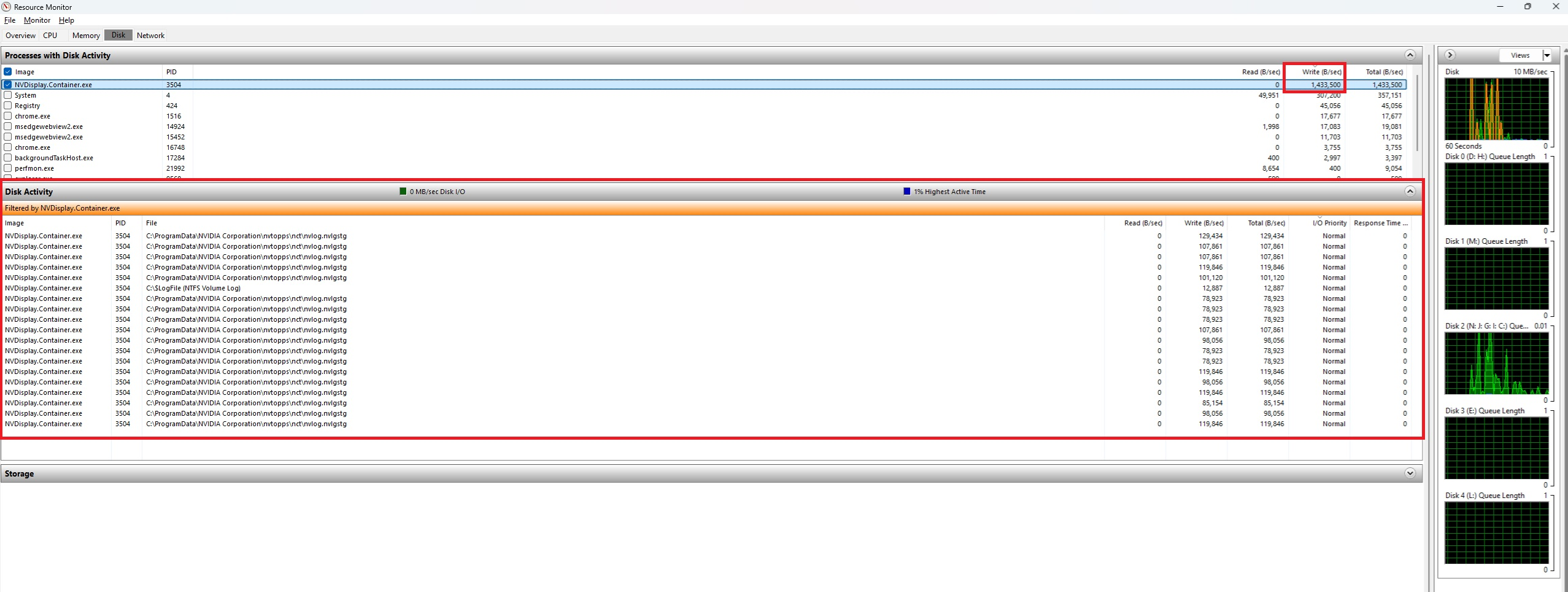
Testing on an idle RTX 4090 showed NVDisplay.Container.exe writing approximately 1.43MB per second to nvlog.nvlgstg, even with Highlights, ShadowPlay, and the overlay disabled. However, several users running the same drivers have reported no unusual activity, so systems should be checked individually before drawing conclusions.
Reverting to Driver 621.01 May Restore RTX 50 Black-Screen Problems
Nvidia’s release notes state that video playback may freeze or display a black screen on some RTX 50-series GPUs and RTX Spark systems after installing driver 621.01. Nvidia addressed that problem in the 621.12 hotfix and subsequently in version 621.14, which is the driver associated with the reported SSD-write behavior.
RTX 40-series and older GPUs are not affected by that specific video-playback problem, while RTX 50 owners may have to choose between the two driver issues. No available report has confirmed whether the 621.12 hotfix also produces the repeated SSD writes.
Andergraude found that stopping the NVIDIA Display Container LS service, deleting nvlog.nvlgstg, and restarting the service temporarily reduced write activity by approximately 91%. However, the file eventually began growing again.
Another user running driver 621.24 performed three clean installations using DDU, but the procedure did not resolve the problem. Disabling the NVIDIA Display Container LS service completely may stop the writes, but doing so also removes access to the NVIDIA Control Panel and Nvidia App.
How to Check Whether Nvidia’s Driver Is Writing to Your SSD
Press Win + R, enter resmon, and open Resource Monitor.
Select the Disk tab and sort Disk Activity by Write (B/sec).
Check whether NVDisplay.Container.exe is repeatedly writing to nvlog.nvlgstg while the system is idle.
To measure writes that physically reach the SSD, record the Host Writes or Data Units Written value in CrystalDiskInfo or the SSD manufacturer’s application.
Leave the PC idle for one hour, then compare the updated value with the original reading.
Task Manager can identify which drive is busy, but Resource Monitor provides the name of the specific file being written.
Nvidia Has Encountered Similar Behavior Before
In 2021, Nvidia’s 471.96 driver fixed an issue that caused NVDisplay.Container.exe to write continuously to a different file in the company’s nvtopps folder. A Dell Community report from January 2025 also described repeated rewriting of the nvlog file, indicating that similar logging behavior has occurred before.
AMD recently addressed a comparable problem involving its External Events Utility. The company acknowledged the issue and fixed idle write activity affecting Radeon RX 7000-series and newer GPUs in the optional Adrenalin 26.11.1 driver, released on November 12.
Nvidia has previously responded quickly to driver-related problems, including releasing a driver after Windows 11 updates reduced gaming performance. However, the company has not yet addressed this SSD-write issue in its forums or release notes, leaving affected users to investigate temporary workarounds themselves.