
Why Windows Remembers USB Storage Devices After They Are Unplugged
Concerns about Windows retaining personal information often arise when someone prepares to donate or sell an old PC. One common question is whether resetting the computer removes stored data and whether Windows quietly preserves information about previously connected devices.
Social media posts sometimes claim that Windows keeps a permanent record of every USB device ever connected to a PC. There is a genuine Windows behavior behind this claim, but viral posts often present it as far more intrusive than it actually is.
Linux and macOS also retain hardware information and system logs. MS has documented the Windows behavior for more than a decade.
Here is what Windows stores about USB drives, why it retains that information, how to inspect the records, and what happens to them when the PC is reset.
Why Windows Retains Information About USB Drives
MS documented in 2012 that when a USB storage device is inserted, Windows creates a USBSTOR registry key containing the information the operating system needs to identify and configure that device.
The registry location is:
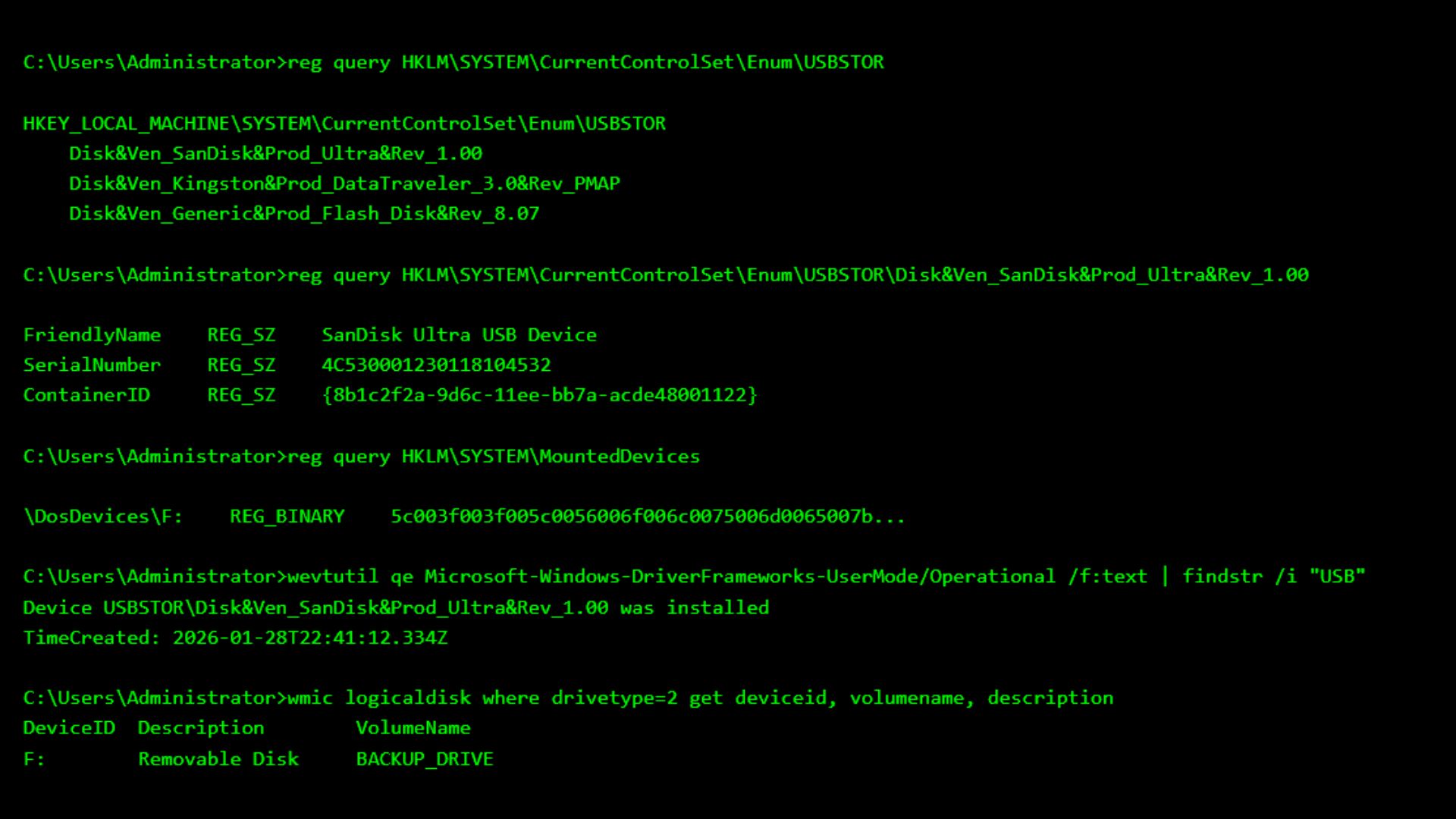
HKEY_LOCAL_MACHINE\SYSTEM\CurrentControlSet\Enum\USBSTOR
Windows creates device registry information even when a storage device is connected only briefly. Cleanup may be left to other software because Windows cannot determine whether a disconnected device has been removed temporarily or permanently.
When a USB drive is unplugged, Windows cannot know whether it will be reconnected later. Plug and Play therefore retains the device instance so the system can recognize and configure the drive more efficiently the next time it appears.
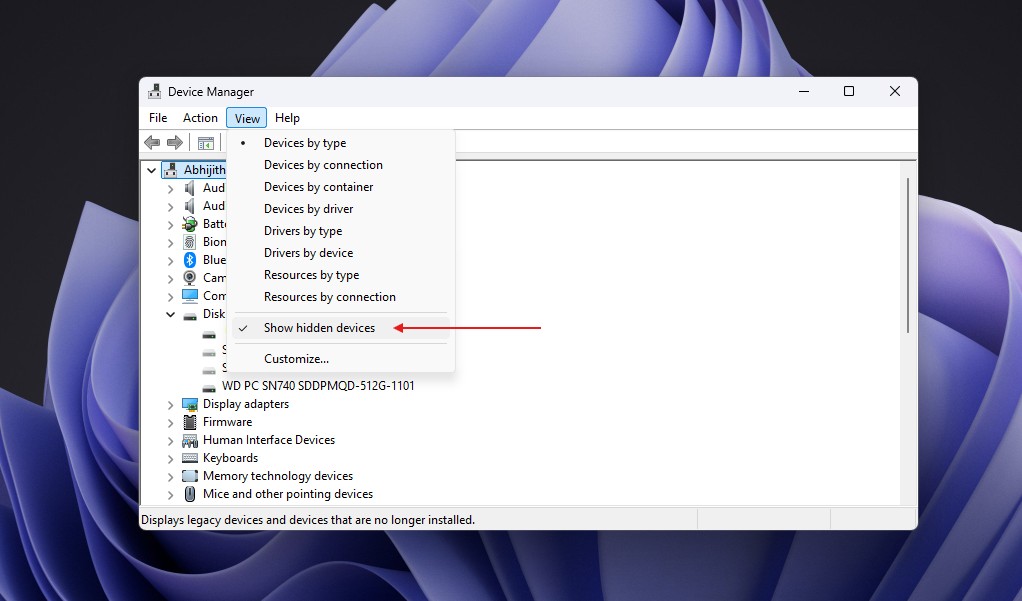
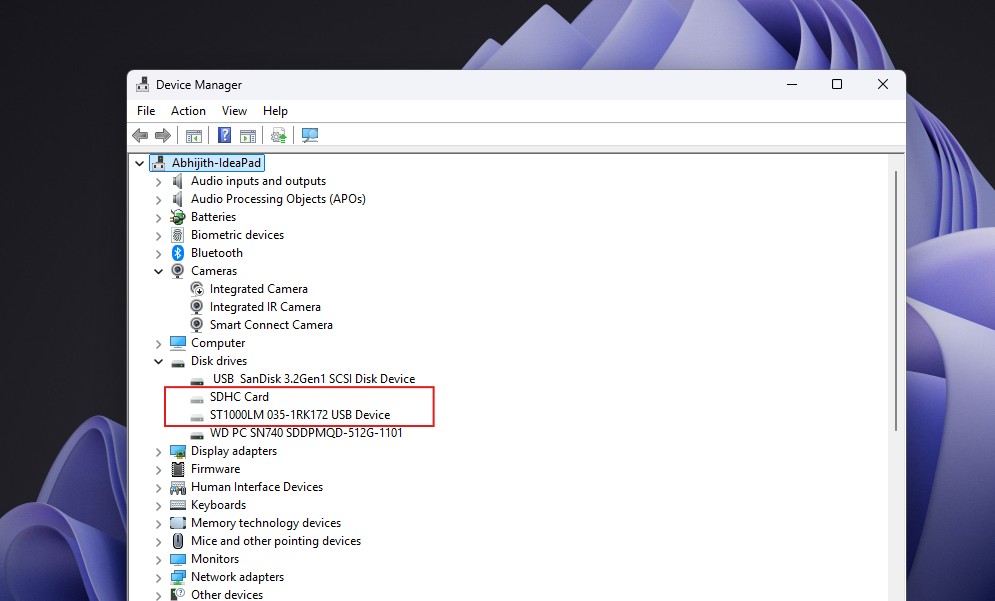
MS refers to physically disconnected devices whose registry entries remain as non-present devices or phantom devices. They can be displayed in Device Manager by selecting View > Show hidden devices.
USBSTOR is not a list of every USB accessory connected to the computer. It applies to mass-storage devices managed by the Usbstor.sys driver. Windows also uses the separate Uaspstor.sys driver for devices based on the newer USB Attached SCSI protocol, which is designed to improve storage performance.
USB keyboards, webcams, mice, and microphones do not appear under USBSTOR merely because they use a USB connection.
This behavior is not unique to Windows. Linux uses udev to maintain a database of processed devices, while macOS retains hardware information through IOKit and records system events through its unified logging system. Operating systems need this information to identify hardware, load appropriate drivers, and assist with troubleshooting.
Windows does remember previously connected USB storage devices, but the important distinction is what information it actually retains.
What Windows Knows About a USB Drive
Windows may store a readable device name, such as SanDisk Ultra USB Device, together with hardware and instance identifiers derived from information reported by the device.
Depending on the hardware, retained information may include:
The device name and hardware identifiers.
Serial-number or connection-location information.
The date when the device was first configured.
The most recent arrival or removal time.
The drive letter assigned to the volume.
However, the USBSTOR records discussed here do not contain a list of files stored on the drive. On their own, they also do not show whether any files were copied. Other Windows features, including Recent Items or removable-storage auditing, may leave separate evidence.
Querying USBSTOR Records
To inspect USBSTOR records, open Windows PowerShell and run:
reg query "HKLM\SYSTEM\CurrentControlSet\Enum\USBSTOR" /s
The /s option queries every subkey below USBSTOR. Each model key contains one or more device-instance subkeys. Depending on the device, an instance identifier may include serial-number or location information.
A device name alone does not prove that one specific physical drive was connected. Multiple drives can share hardware identifiers, and USB devices are not required to report a serial number.
Creating a Cleaner Device List
PowerShell's Plug and Play cmdlet can produce a more readable list:
Get-PnpDevice -Class DiskDrive |
Where-Object { $_.InstanceId -like 'USBSTOR\*' } |
Format-List Status, FriendlyName, InstanceId
Get-PnpDevice displays devices known to Plug and Play, including devices that are no longer connected. Adding -PresentOnly limits the results to currently connected hardware.
To test this behavior, connect a USB drive, run the first command, and note its InstanceId. Safely eject and disconnect the drive, then run the original command along with:
Get-PnpDevice -PresentOnly -Class DiskDrive |
Format-List FriendlyName, InstanceId
If Windows retained the record, the drive will disappear from the -PresentOnly results but remain in the broader Plug and Play list.
Checking Device Timestamps
To inspect available timestamps, assign the complete instance identifier to $deviceId and run:
$deviceId = 'PASTE_THE_FULL_INSTANCE_ID_HERE'
Get-PnpDeviceProperty -InstanceId $deviceId |
Where-Object { $_.KeyName -match '_(FirstInstallDate|InstallDate|LastArrivalDate|LastRemovalDate)$' } |
Format-List KeyName, Data
FirstInstallDate indicates when Windows first installed that device instance.
InstallDate indicates when it was most recently installed and may change after a driver update.
LastArrivalDate and LastRemovalDate contain only the latest applicable values.
These fields do not provide a complete history of every time the USB drive was connected or removed.
Reviewing the SetupAPI Log
Windows also records device installation activity in the plain-text SetupAPI log located at:
%SystemRoot%\INF\setupapi.dev.log
Use the following PowerShell command to search the log for the selected device:
Select-String -Path "$env:SystemRoot\INF\setupapi.dev.log" -SimpleMatch -Pattern $deviceId -Context 3,12
A matching entry shows that SetupAPI recorded an installation event for the device. It should not be interpreted as a complete record of every subsequent connection.
Inspecting Persistent Drive-Letter Mappings
The following registry query displays the mount manager's persistent name database:
reg query "HKLM\SYSTEM\MountedDevices"
This database maps volumes to drive letters and may retain names for volumes that are no longer connected. An entry such as \DosDevices\F: does not identify a particular SanDisk drive unless its binary data is matched to that device's volume.
How to Remove USB Device Records
To remove a retained device entry, open Device Manager, enable View > Show hidden devices, right-click the greyed-out drive, and select Uninstall device.
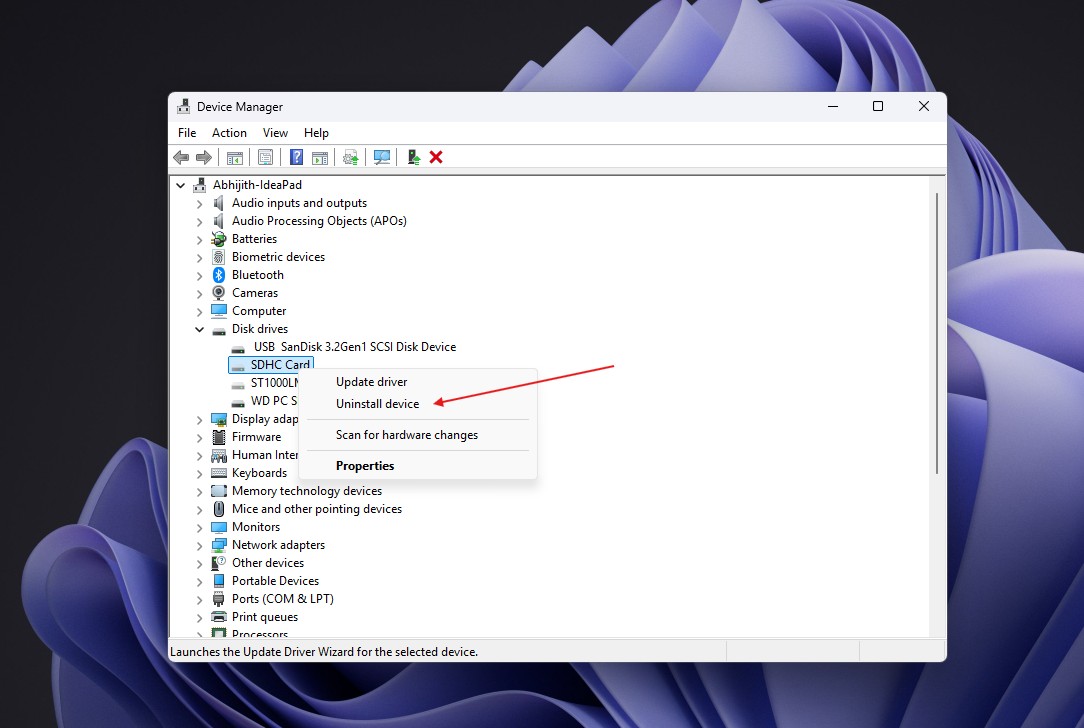
MS states that a device's registry keys are automatically deleted when the device is uninstalled. IT administrators can also remove phantom storage entries in bulk with MS's DevNodeClean utility.
Do not manually delete USBSTOR registry keys. Incorrectly removing these entries can damage USB functionality and potentially make the PC unusable.
Does Resetting Windows Remove These Records?
MS recommends the Remove everything reset option when a PC is being sold, donated, recycled, or transferred to a new owner. This option reinstalls Windows and removes personal files, applications, and settings. Because the operating system is reinstalled, records from the previous USBSTOR installation should not carry over.
There is an important limitation: a standard reset does not format the Windows volume. Instead, it removes user files individually. Before transferring the computer, enable Clean data under Change settings. MS says this makes deleted files more difficult for another person to recover, although it does not satisfy government or industry data-erasure standards.
If the computer contains additional partitions or drives, select the option to remove files from all drives as well.
Windows retains many forms of metadata for legitimate technical reasons. One example is file-system tunnelling, which can assign a newly created file the creation date of a recently deleted file with the same name. A properly configured Remove everything reset removes the previous Windows installation and its data, but it should not be regarded as a universal forensic-erasure method.
Can a USB Record Prove That Files Were Copied?
No. A USBSTOR entry cannot prove data theft or file copying by itself. It may show that Windows encountered a particular storage device, but it cannot establish which files were copied, whether information moved to or from the device, or who physically connected it.
Windows can audit file access on removable storage through the Audit Removable Storage policy, which may generate events such as Event ID 4663. However, this policy must have been enabled before the relevant activity occurred. Enabling it later cannot reconstruct past file-access records.
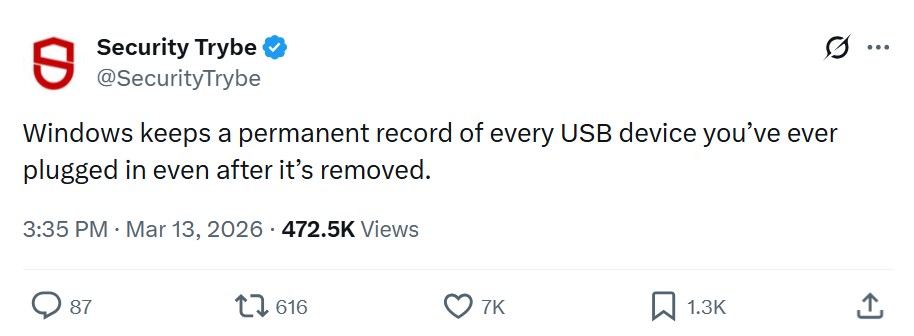
Viral claims are correct only in the limited sense that Windows may remember a USB storage device after it has been unplugged, as other mainstream desktop operating systems also do. The USBSTOR record does not contain the drive's files, cannot independently prove that anyone copied data, and is not permanent. Separate auditing records or other forensic evidence may reveal file activity, but that information is distinct from the USBSTOR device record.