MS Fixes False Windows Defender Alerts on Windows 11
For nearly two months, some Windows 11 PCs incorrectly warned users that MS Defender was turned off, even though the antivirus protection remained active. Reports began appearing in early August, but MS did not acknowledge the problem until the end of that month. This week’s security update has now fully resolved the issue.
False Alerts Appeared Despite Active Protection
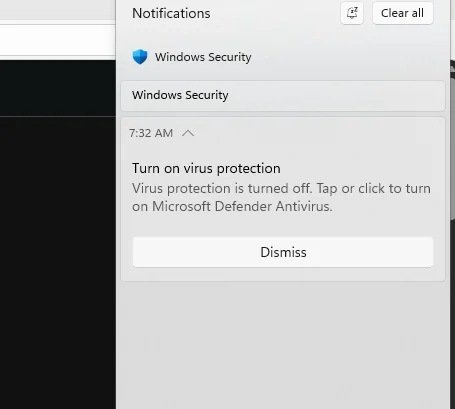
The unusual bug caused the Windows Security app to repeatedly display a warning that Defender was disabled, urging users to reactivate it for protection against threats. Users who opened Windows Security after receiving the alert found that nothing had actually been turned off.
According to MS, the false security notifications affected all versions of Windows 11, Windows Server, and Windows 10.
Testing confirmed that the warning was caused by a software bug. Turning Defender off and back on did not resolve the problem. MS subsequently linked the issue to a recent Defender security update and confirmed the reports.
MS explained that after installing recent MS Defender Antivirus updates, users might receive notifications stating that the antivirus was turned off, even though it was functioning correctly and all settings showed it as active. The company did not identify the specific update that originally introduced the problem.
Because Defender updates are released daily, users could not resolve the issue by locating and uninstalling a conventional Windows KB update. Defender security intelligence and platform updates do not operate in the same way as standard Windows updates.
Selecting one of the false alerts opened the home page of Windows Security, where the protection status remained normal. The app showed that security features were enabled, the PC was protected, and the time of the latest scan was available.
Windows Security may also continue prompting users to enable OneDrive synchronization, but that notification is unrelated to the Defender bug.
Notifications Could Not Be Permanently Dismissed
Although the “Turn on virus protection” warning included a dismissal option, the alert could reappear later. Disabling notifications did not prevent it because Windows Security alerts can bypass many notification-related settings to ensure that important security warnings remain visible.
MS confirmed that the notifications could appear when Windows started and return intermittently afterward, even when notification settings were disabled.
MS Confirms the Defender Fix
In an updated support document, MS stated that users do not need to take manual action. The fix should be delivered automatically to PCs unless mandatory security updates have been blocked through Registry Editor or Group Policy.
MS confirmed that the issue was resolved in MS Defender Antivirus update version 4.18.26080.4, released on September 17, 2026.
How to Verify That Defender Is Running
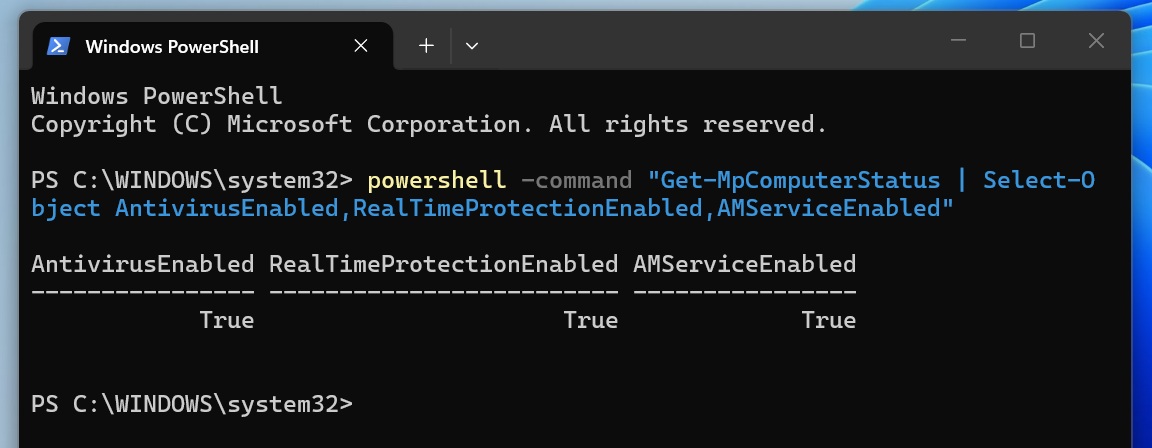
Although the false alerts should no longer appear after installing the update, users can verify Defender’s status by opening Windows Security and reviewing the current protection information. If the app reports that protection is active and displays the time of the most recent threat scan, Defender is operating normally.
PowerShell can also generate a security status report. The relevant results should return three True values, confirming that Windows Defender features, including real-time protection, are working correctly.
The issue had been reported since the first week of August, leaving questions about why a complete fix took nearly two months to arrive.
Alongside the Defender notification problem, MS is addressing several other Windows 11 issues, including audio problems and errors affecting AMD-based PCs.